Your organization, as a working model.

One model of your org — people, costs, skills, programs, networks — that you can see, understand, change, and defend. Runs in your browser, on your machine, live on your own CSV in under a minute.

Free for orgs up to 25 people — no card, no sales call · works offline after sign-in · .orgpack files are yours
OrgTool
Saving… Saved · v12 · 14:22
Chief Information Officer
Morgan Ellis · L8
VP Application Services
Jordan Blake · L8
ATLAS PROGRAM
Head of Platform Ops
OPEN · NEW ROLE
External Security Consultant
CONTRACTOR
ATLAS PROGRAM → dotted: J. Blake
sha256 9f2c…d4a41 nothing has left this machine
< 1 min
from CSV drop to a rendered, analyzable org — columns auto-map, managers resolve, in your browser.
1 file
the entire platform, ~3.5 MB — no implementation project, nothing to configure.
1 hash
deterministic analysis: same inputs, same outputs, same SHA-256 — six months later, in a deposition, the numbers still reproduce.
Act 1 · See

Organizations aren't trees. Your tool shouldn't pretend they are.

Dotted-line managers are data, not decoration. People carry program and product assignments across department lines, synergy tags mark overlap, vacancies and contractors are first-class node states — and the whole matrix exports to its own slide in the board deck. Beside the chart: a full data grid with nine column groups, inline editing, and saved views.
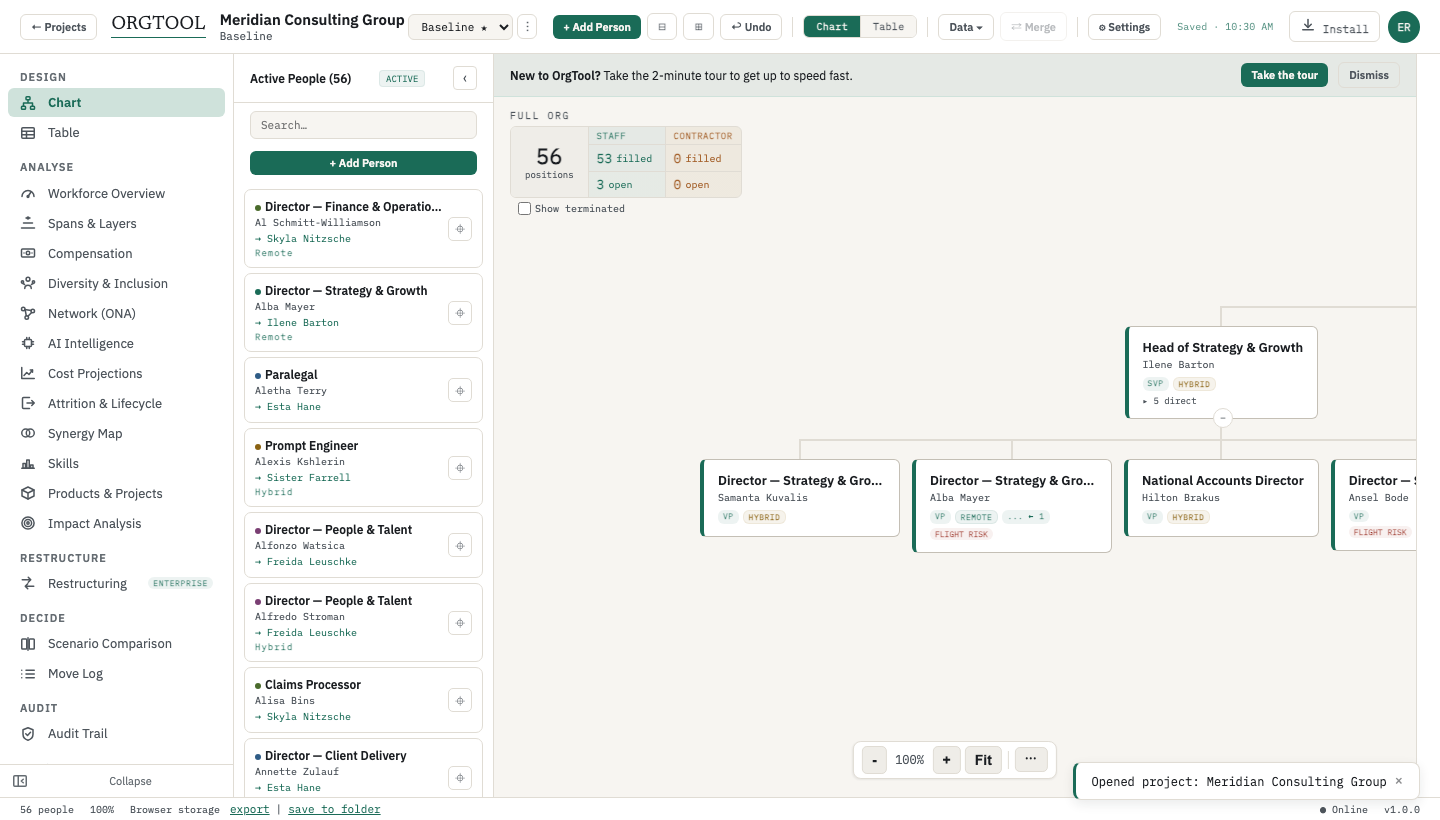
OrgTool org chart with matrix relationships, vacancies, and contractors
Real capture from the current build — 60-person demo org.
Act 2 · Understand

Every node is a computed record. So the chart answers questions.

Health score and risk radar, spans & layers against segment targets, compensation and pay-equity analytics, succession coverage and single points of failure, the informal network in five dimensions, and per-role AI exposure — computed locally, explainable to a board.

Health & structure
Composite org health score · risk radar · spans & layers with segment targets · grade-distance anomalies.
People & continuity
Succession coverage (successors, readiness, flight risk) · single-point-of-failure detection · impact-of-removal analysis before any decision.
Money & fairness
Compensation analytics · pay-band placement · diversity & pay-equity analysis · cost projection & attrition.
Networks & AI
Five-dimension ONA with deterministic broker/connector metrics · per-role AI-exposure scoring and reskill pipeline — the 2026 reorg's evidence base.
Act 3 · Change

Branch. Plan. Merge. Like version control, for the org.

Change is comparison, not edict: unlimited scenarios against a baseline, drag-to-redesign with live cost and span deltas, side-by-side diffs of added, removed, and moved people. Workstream leads plan in parallel on their own machines; OrgTool three-way-merges the copies, surfaces conflicts for a decision, and lands every merge as a version snapshot.

branch · plan · merge · snapshot
Merge review · from Sawyer Bell
Sloane Vega → reports to Spencer Hall
Accepted
3 open roles added under Platform Ops
Accepted
Conflict: Peyton Cross — Redundant vs Retain
Decide
on apply: version snapshot v13 · computed on your machine
Act 4 · Defend

When the change is a reduction, the model becomes the record.

Draw a RIF selection and the EEOC 80% rule, Fisher exact tests, and federal and state WARN thresholds evaluate as you click. When the pack goes to counsel, it carries the full analysis and the hash that proves nothing moved after the fact — the strategic case and the legal record are the same document.

How the audit pack works →
Adverse impact on gender. Selection rate for F fails the 80% rule at 67%. This selection, as drawn, is not defensible.
GroupRateRatio80% rule
gender · M13.0%100%PASS
gender · F8.7%67%FAIL
ethnicity · Asian9.5%86%PASS
The 30-minute run

CSV to board-ready in one sitting.

The consultant's benchmark: walk in with an export, walk out with the diagnosis and the deck. Every step below is a shipped screen, not a demo script.

Run it on your own CSV
  1. min 0–1
    Drop the CSV. Columns auto-map, managers resolve — in your browser.
  2. min 1–5
    Walk the real org. Matrix lines, programs, vacancies, contractors — visible.
  3. min 5–10
    Read the diagnostics. Health score, spans & layers, succession gaps, single points of failure.
  4. min 10–20
    Branch a scenario. Drag the redesign; cost and span deltas update live.
  5. min 20–25
    Compare side by side. Baseline vs proposal: added, removed, moved, and what it costs.
  6. min 25–30
    Export the deck. Client-ready PPTX — per-manager slides, impact summary, matrix slide.
Who it's for

Built for the people in the room when it's decided.

CHROs & people leaders

Succession coverage, spans & layers, pay equity — and a board pack that exports itself.

Start at Understand →
Independent consultants

Client data on your laptop, not your firm’s tenant. CSV to client-ready deck in one sitting.

Run the 30 minutes →
Large consulting firms

Workstream leads branch in parallel and merge with an audit trail; Team licensing per practice.

See Team licensing →
Clean-room restructuring

Isolated by architecture, deterministic by design, and an audit pack built for counsel review.

Start at Defend →
Where OrgTool fits

Built for the work that can't leave the building — and the teams just getting started.

Regulated & high-sensitivity environments

Financial services, healthcare, public sector — anywhere the review board's first question is "where does the data live?" Here the answer is short: on hardware you control, offline if you like, in encrypted files you hold. Nothing new for a vendor to hold, nothing new to clear.

Startups & scaleups

Free for one org of up to 25 people: sketch the first real chart, model the hiring plan as scenarios, add grades before comp drifts. The same file grows into the full analytics stack as you do. Start with org design for startups in our Learn library.

Consultancies & transformation teams

Engagement data stays on the consultant's machine, scenarios clone per option under review, and the deliverable exports straight to the client's PPTX template — with an audit trail the client can keep.

Local-first is the foundation, not the ceiling. On our roadmap: HRIS connectors and a managed cloud edition built on this same engine — the same analytics, the same deterministic, verifiable outputs, with your choice of where they run.
Private by design

Isolation-grade privacy, as a standard feature.

Zero breach surface

Your org never becomes a vendor tenant. There is no server-side copy to steal, leak, or subpoena.

Encrypted by default

.orgpack files encrypt with AES-256-GCM under a passphrase only you hold. A separate admin passphrase can cryptographically wall off cost and demographic fields.

Verifiable forever

Restructuring exports are deterministic and SHA-256-stamped; our Ed25519 key is public, so anyone can verify a pack offline — without an account, without us.

Works anywhere

Full function on a plane, at a client site, or in a closed room. Sign in once with an emailed code; the app then works offline for days.

Nothing to disclose

The sensitive plan stays with the people planning it. No new vendor holding workforce data, no addition to the disclosure list.

Instant procurement

Buying is a software licence — a signed key, verified locally. Not a DPA negotiation, a security review, or a data-residency workshop.

We cannot read your org, reset your passphrase, or comply with a subpoena for your data. We don't have it — and that's the feature. The full security model →
OrgTool Learn

The modern restructuring library.

All articles →
FAQ

Frequently asked questions

Answers restate claims verified file-by-file against the current build — see claims/ in the site repo. Last verified July 2026.

What is OrgTool?
OrgTool is org design and workforce planning software that turns your organization into a working model: every person is a computed record — cost, grade, skills, succession, retention, network ties, AI exposure — so the chart drives real analysis. You design and compare scenarios, map matrix and program structures, plan succession and skills, run network analysis, and — on the Enterprise plan — take a RIF selection through EEOC 80%-rule and WARN analysis that exports as a hash-stamped audit pack. It runs entirely in your browser, on your machine.
Is a local-first tool less capable than a cloud platform?
No — the architecture changes where the computing happens, not how much of it there is. OrgTool carries the full category stack: unlimited scenarios with baselines, versions, and side-by-side diffs; spans & layers; compensation, diversity, and pay-equity analytics; cost projection and attrition; five-dimension organizational network analysis; AI-exposure scoring; and a restructuring workbench with live adverse-impact and WARN evaluation plus hash-stamped exports. What you give up is a standing HRIS pipe — imports are a 60-second CSV drop instead. What you gain is that none of it ever lives in a vendor tenant.
Does my org data ever leave my machine?
No. Org data stays in your browser's local storage and in .orgpack files in a folder you choose. Three things ever touch the network, each by your own action: signing in with an emailed code, optional AI analysis using your own Anthropic API key, and checkout/licensing after a purchase. What we hold server-side is account metadata only — email, org name, plan tier — never the org itself. Full detail on the security page.
Is the free plan actually usable?
Yes — one organisation of up to 25 people with the full org chart, table view, scenario editing, and CSV import. Exports (PDF/PPTX/CSV) require a paid plan. Every plan needs an account: you sign in once with an emailed code and the app then works offline for days.
Does OrgTool integrate with my HRIS (Workday, BambooHR, HiBob)?
Not yet — and in v1 that's a deliberate strength: you import a CSV export, columns auto-map, and manager references resolve in your browser, so no standing copy of your workforce data exists anywhere but with you. HRIS connectors and a managed cloud edition are on our roadmap, built on this same engine with the same deterministic analysis. Today, if always-on sync and employee self-service are the requirement, see the honest comparison on vs ChartHop.
Can OrgTool really handle matrix organizations?
Yes — as data, not decoration. Dotted-line managers are first-class fields on the person record, cross-boundary relationships render as ghost nodes and overlay lines on the chart, people are assigned to products and programs with status tracking, and the PPTX export includes a dedicated matrix-relationships slide. See matrix & program organizations.
Can my team work on the same plan?
Yes — in parallel, without a server. Each workstream lead takes a copy of the scenario; OrgTool runs a three-way merge against the common ancestor, surfaces conflicts for a decision, and lands every merge as a version snapshot. Admin, editor, and viewer roles travel inside the encrypted .orgpack itself, so read-only counsel access doesn't need a server either.
Do the AI features see my data?
Only if you opt in, only the fields you approve, and only with your own Anthropic API key. AI analysis is off by default, consent-gated per run, and revocable at any time. Everything else in the product is deterministic local computation.
What do I need to run OrgTool?
A modern browser on macOS, Windows, or Linux — the whole app is a single file of about 3.5 MB. Saving .orgpack files directly to a folder uses the File System Access API in Chromium-based browsers; elsewhere the app falls back to in-browser storage with file download and import.
In one paragraph

OrgTool turns an organization into a working model on the planner's own machine: every person a computed record across cost, skills, succession, retention, networks, and AI exposure, every structure — including true matrix and program assignments — modelled as data. You see the org as it really is, understand it through spans & layers, compensation, diversity, and network analytics, change it through branchable, mergeable scenarios, and when the change is a reduction, defend it with live EEOC 80%-rule, Fisher's exact, and federal + CA/NY/NJ/IL WARN analysis exported as a deterministic, SHA-256-stamped audit pack counsel can verify offline. Org data lives in encrypted .orgpack files, never in a vendor cloud. Free for one org of up to 25 people; Pro from $49 per person per month.

Copy-paste friendly — for the email to whoever decides.